Because of the steep price of Apple MacBooks and other high-end Windows-based laptops and notebooks, there has been a resurgence in the popularity of Chromebooks.
Chromebooks come in many different form factors and specs, but can all achieve essentially the same thing, which is running Chrome OS. These notebooks can surf the web, use Chrome applications, and use Google apps in the specialized dock to do many of the things one would be able to do on a Windows or MacOS notebook.
These days, Chromebooks is quite common in schools and in homes and it is expected that more of them would be seen in the next few months and years ahead.
It has become clear that a number of companies have realized that Chromebooks are an attractive option for a lot of uses, and have adjusted their catalogs accordingly.
The [easyazon_link identifier=”B01H5EFSJQ” locale=”US” tag=”masterherald-20″]Lenovo N22 Touch Chromebook[/easyazon_link] is one of the newest on the block. It is actually a pretty decent device with an amazing price.
If one just needs something to browse the web that is light and portable, the Lenovo N22 Touch Chromebook is a fantastic choice.
While it is designed for early education, it could be a great addition to anyone who uses their phone for most things but would like something to use that has a bigger screen and they can type on at a coffee shop or while they’re out, points out the Android Authority.
Even though the Chromebook comes in all kinds of sizes, shapes, and with all variety of different options, the Lenovo N22 Touch Chromebook is certainly the rugged, spill-resistant Chromebook with good battery life and a touchscreen.
Very light in weight
The Lenovo N22 Touch Chromebook is made of a thin black plastic material and weighs just 2.7 lbs. It can be thrown in a backpack without having to worry about ruining the user’s back.
It uses a clam-shell form factor which houses the keyboard and screen, which is relatively recessed into the top half of the notebook.
The notebook features a webcam built into the top of the device which can rotate 180 degrees. This allows users to show to whom they are chatting with what the world is like around them, though the video quality is not exactly great.
It uses a 720p sensor, so one would likely be better off using their phone camera if they want to show things off, but it can still be helpful in a pinch, especially for younger students who may not have a smartphone of their own just yet.
The Lenovo N22 Touch Chromebook comes with two USB 3.0 ports each offering data and charging. There is a 2-in-1 card reader present so the user can transfer photos to his Google account and edit them with online tools, and HDMI port for video out, and a combo 1/8″ stereo headphone output port.
Bright and easy to read
The screen is an 11.6″ TN panel with touch compatibility. It looks pretty great especially for its 1366 x 768 resolution although there is still plenty to be desired for its touchscreen abilities.
The 11.6” touch display is also bright and easy to read with its resolution. It should be noted that too much higher resolution on a smaller screen like that of the Lenovo N22 Touch Chromebook and words and icons will be harder to read and see.
Higher resolution also equals higher price, so there’s a definite line to walk in that regard. The good news is, the display looks very good. The text is crisp and easy to read, movies and YouTube videos look good.
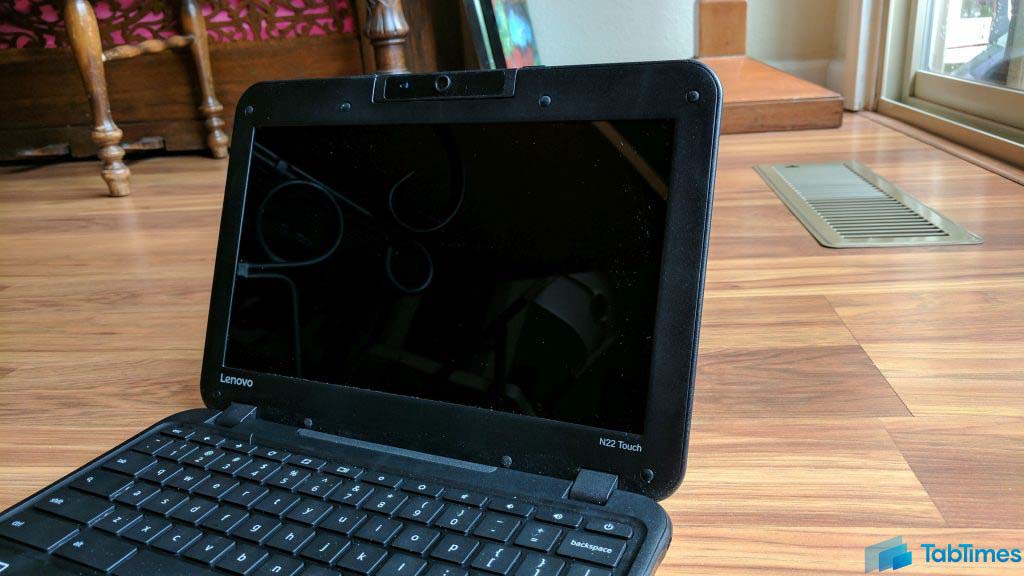
Typed text is clear and easy to work with. There is a relatively large bezel around the outside of the display, though it is another feature meant to help ruggedize the Chromebook.
Another thing going for the Lenovo N22 Touch Chromebook is the fact that ChromeOS is ChromeOS across any device that runs it.
While there are the occasional models that will also run Android apps, but the software experience is otherwise pretty consistent across the board.